Shared Hosting vs WordPress Hosting: 2026 Guide
Difference Between Shared Hosting and WordPress Hosting: 2026 Guide
Ever feel like web hosting is just a swirl of jargon, price tags, and way-too-enthusiastic ads? (Trust me, I've been there, midnight, Googling "shared vs. WordPress hosting," obsessively comparing price tables.) If you're launching a WordPress site, or simply trying to avoid a hosting disaster, knowing the difference between shared hosting and WordPress hosting is absolutely crucial.
This guide is your real-world, peace-of-mind breakdown. We'll cut through the jargon, share firsthand stories, and give you concrete examples, insider checklists, and frank advice (including when to just… not listen to the hype). By the end, you'll be able to tell what matters for your budget, your goals, and maybe even your sanity. Let's jump into what actually sets shared hosting apart from WordPress hosting, and which one's right for you.
Key Takeaways
- Shared hosting is an affordable solution for basic websites, but it shares server resources among many users, which can impact performance and security.
- WordPress hosting is optimized specifically for WordPress sites, offering better speed, security, automatic updates, and expert support, but usually at a higher cost.
- Shared hosting is ideal for hobby bloggers, small portfolios, and local business websites, while WordPress hosting is better suited for serious bloggers, businesses, and e-commerce sites.
- Managed WordPress hosting includes valuable features like daily backups, staging environments, and built-in caching, which can save you time and reduce technical headaches.
- Upgrading from shared hosting to WordPress hosting is recommended when your site experiences frequent slowdowns, security issues, or you need to delegate maintenance tasks to experts.
- Choosing the right hosting depends on your website's needs, growth plans, and budget, so compare features, support options, and true renewal costs before deciding.

Start fast with Shared Web Hosting
The simplest, most affordable way to get online. Includes SSL, CDN, and solid performance.
Browse plansDifference between Shared hosting and WordPress hosting: TL;DR (quick answer)
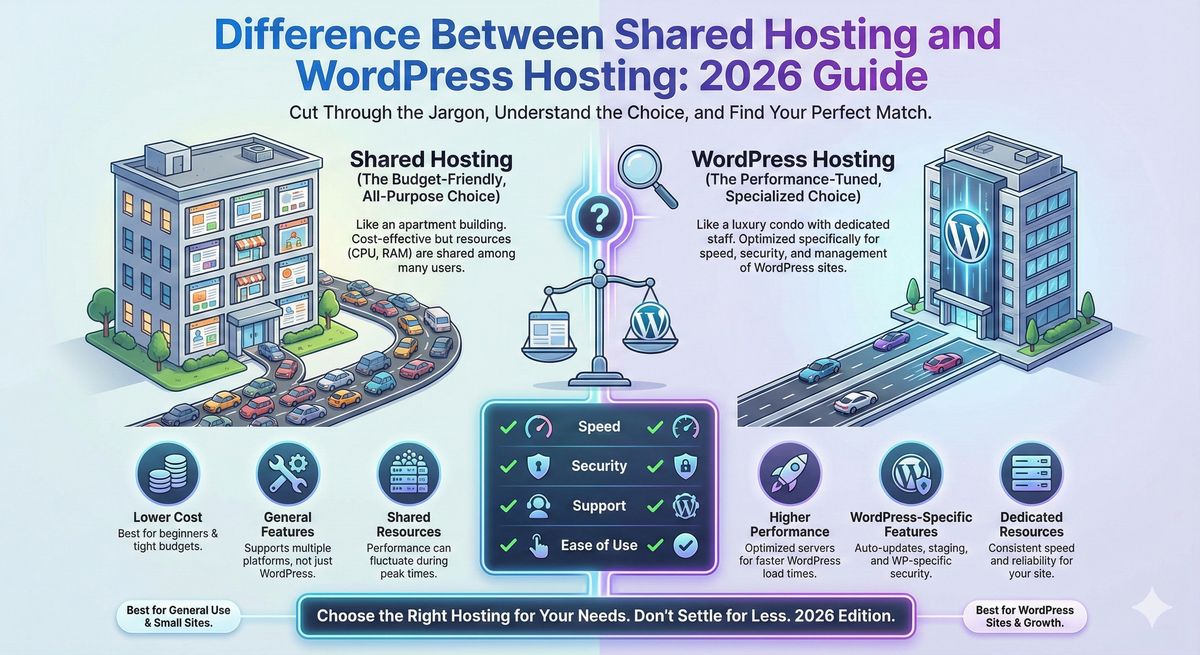
Shared hosting is like renting an apartment with a bunch of strangers, everyone splits resources, there are a few house rules, and it's cheap. WordPress hosting (especially managed WP hosting) is more like getting your own condo, renovated just for you, with maintenance staff on call, and yes, that means extra perks, but usually a higher price.
If you just need the basics or you're on a shoestring budget? Shared hosting works. Planning to run a serious WordPress site, need speed, security, and convenience? You'll want WordPress hosting (Devoster is a fantastic place to start if you need the best of both worlds).
What is shared hosting?
How shared hosting works (server resources, multi-tenant environment)
Imagine moving into a big house with roommates you've never met. You all share the same kitchen (server resources), so when one person decides to marathon-bake bread (surge of traffic), the oven (CPU) slows down for everyone. Shared hosting splits one server's resources between dozens or hundreds of sites, cheap, but sometimes crowded.
Typical features of shared hosting (control panel, email, resource limits)
- Control Panel: Usually cPanel or a white-label equivalent, think of it as your site's command center, handling domains, emails, databases.
- Email Accounts: Built-in emails (e.g., yourname@yourdomain.com): often unlimited, but with storage caps.
- Storage and Bandwidth: "Unlimited" is common in marketing, but every host has fair use limits, don't expect Netflix-level streaming.
Pros and cons of shared hosting (cost, ease vs performance and security limits)
Pros:
- Super affordable (often $2–$5/month to start)
- Easy setup, even for total beginners
Cons:
- Speed can tank if your neighbor spikes
- Security risks, if someone else gets hacked, it could spill over
- Fewer advanced features or tuning
Who should pick shared hosting? (buyer personas and use cases)
Perfect for:
- Hobby bloggers, personal resume sites, portfolios
- Local clubs, basic business card websites
- Anyone testing the waters (or the process) before going bigger
Not ideal for:
- E-commerce, high-traffic blogs, mission-critical business URLs (imagine if your site slows down on Black Friday... yikes)
What is WordPress hosting?
Types of WordPress hosting: Shared WordPress vs Managed WordPress vs WP VPS/dedicated
Here's where it gets spicy, WordPress hosting isn't one-size-fits-all. There's:
- Shared WordPress hosting: Like shared hosting, but with some bonus WP perks
- Managed WordPress hosting: White-glove service, automatic updates, backups, top-tier security, and performance built for WordPress
- WordPress VPS/Dedicated: For when you need absolute control and horsepower (think agencies or super high-traffic brands)
Core WordPress hosting features (managed updates, WP-specific caching, staging)
Look for:
- Managed Updates: Auto-core, theme, and plugin updates
- WP Caching & Speed Tuning: Built-in caching solutions (Redis, Varnish, etc.), optimized for WordPress's quirks
- 1-Click Staging: Test changes before breaking your live site
- Security Extras: WAF, DDoS protection, free SSL, auto-patching
Pros and cons of WordPress hosting (performance, security, cost, vendor constraints)
Pros:
- Built for WP, fast, safe, easy to update
- Better support (WP experts, not just generic techs)
- One-click features save hours of tinkering
Cons:
- Pricier, managed WP starts around $10–30/mo and up
- May restrict some plugins/themes for security
- Less flexibility for non-WP sites
Who should pick WordPress hosting? (bloggers, agencies, e-commerce, high-traffic sites)
Perfect for:
- Serious bloggers wanting to grow
- Small businesses, agencies, designers running multiple WP clients
- E-commerce or popular sites (WooCommerce, heavy traffic, etc.)
If you want totally set-it-and-forget-it? Managed WP hosting is hard to beat. Devoster's managed plans, for example, have pulled some of my crashiest sites back from the dead in minutes.
Shared hosting vs WordPress hosting: side-by-side comparison
Let's put these side-by-side. (Grab your popcorn. Or your budget spreadsheet.)
| Feature | Shared Hosting | WordPress Hosting (Managed) |
|---|---|---|
| Performance & Speed | Basic, limited caching/tuning | WP-optimized, solid state drives, caching layers |
| Security | Basic firewall, shared risk | WP-specific WAF, malware scans, isolation |
| Scalability | Not great for spikes, limited | Can auto-scale: resources optimized |
| Uptime/Reliability | 99.9% typical, but can dip | 99.99%, often with compensation SLAs |
| Backups/Restore | Weekly/manual (sometimes) | Daily automatic, instant restores |
| Support | General tech support | WordPress experts available |
| Management | You maintain, fewer auto-updates | Managed updates, staging, tools |
| Customization | More raw access: less locked down | Some plugin/theme restrictions, but pre-configured for WP |
| Email/DNS/Domain | All included (usually) | Sometimes extra or limited email |
| Price Range | $2–$10/mo (intro) | $10–$40/mo (plus add-ons) |
Performance & speed (caching layers, PHP-FPM, HTTP/2, CDN support)
Ever had a blog post go viral, only to see your site slow to a crawl? Shared hosts can choke on traffic spikes. Managed WordPress hosts often come with HTTP/2, NGINX, object/object caching, and built-in CDN support, think Devoster's turbo setup.
Security (isolation, WAF, malware scanning, auto patching)
You're only as strong as your messiest neighbor on shared hosting. WordPress hosting includes firewalls (WAF), malware scans, and, on premium setups, instant vulnerability patching.
Scalability & handling traffic spikes (burstable resources, autoscaling)
Don't expect shared hosting to handle viral traffic, resources are fixed. Managed platforms usually autoscale: no more "account suspended for CPU abuse" emails.
Uptime, SLAs and reliability
Shared hosting: 99.9%, but not always enforced. WordPress hosting: 99.99% with real money-back SLAs if they slip.
Backups, restore points and disaster recovery
Shared: Maybe a weekly backup if you remember to turn it on. Managed WP: daily, weekly, and one-click rollbacks out of the box. Trust me, after one botched plugin update, you'll thank yourself.
Support & WordPress expertise (level of support, managed services)
Shared: Generic tech help, sometimes a day wait. WP hosting: Real WP geeks, you can ask, "Help, my plugin broke Gutenberg." and get an answer.
Management & maintenance (auto-updates, staging sites, developer tools)
Shared: You're the admin. WordPress hosting: They'll handle updates, offer staging, even developer tools like WP-CLI and Git.
Control & customization (SSH, WP-CLI, PHP modules, plugin restrictions)
Shared hosting usually gives full cPanel, SSH, PHP tweaks, but you risk breaking things. Some managed WP hosts block risky plugins but reduce the chances you'll tank your site.
Email, DNS and domain handling differences
Most shared plans include email/DNS: some WordPress hosts charge extra or integrate with Google Workspace or Zoho.
Pricing structure and typical cost ranges (intro vs renewal, add-ons)
Shared plans start super cheap ($2–5/mo), but watch out for renewal spikes. Managed WordPress starts higher, usually $10–30/mo, but you're paying for less hassle.
E-commerce fit (WooCommerce performance, PCI considerations)
Serious about e-commerce? Managed WP hosting delivers way better WooCommerce speed, SSL, PCI compliance hooks. Shared hosting sometimes can't handle large carts or payment security.
SEO impact and site speed considerations
Page speed is king for SEO. WordPress hosting's tuned servers, better caching, and CDN will give you a clear edge if rankings matter.
Feature checklist: what to compare when shopping for hosting
Must-have features for WordPress sites (staging, backups, WP-CLI, caching)
You want, no, you need, these basics:
- 1-click backups and restores
- Staging site for safe testing
- Built-in caching
- WP-CLI access for advanced work
- Free SSL certificate (if it's extra, run away.)
Questions to ask hosts (migration help, backup frequency, resource guarantees)
"How easy is it to migrate my site here, will you help for free?"
"What's your backup schedule, and how quickly can I restore?"
"What happens if I use too many resources, overage charges, or do you throttle me?"
These aren't just details, they're lifelines when (not if) things go sideways.
Cost comparison: example plans and when you’ll pay more
Typical budget shared hosting plan vs managed WordPress plan, sample price ranges
Shared hosting:
- Intro: $2.50–$5/month (Devoster's basic shared is a top pick for price/performance)
- Renewal: $7–$12/month
Managed WordPress:
- Intro: $10–$25/month
- Renewal: Can reach $30–$40/month (especially with premium brands)
Common hidden or add-on costs (backups, CDN, SSL, migrations, email)
- Backups: Some shared hosts charge extra, managed WP almost always includes them
- CDN: Shared rarely includes: Managed WP typically bundles
- SSL: Free LetsEncrypt should be standard, if not, that's a red flag
- Site Migrations: Some hosts charge (especially for complex WP setups), others toss it in for free
- Email: A surprising number of managed hosts don't include email (Devoster does.)
Heads up: Always compare the renewal price, not just the flashy intro deal.
Migration: moving from shared hosting to WordPress hosting (step‑by‑step checklist)
Switching sounds scary, but with the right prep (and maybe some good coffee), it's pretty smooth.
Pre-migration audit (plugins, PHP version, database size)
Take stock: List your plugins, check PHP version (WordPress likes 7.4+), and database/file total size
Migration methods (plugin, host-assisted, manual) and rollback plan
Plugin-based: Tools like All-in-One WP Migration make it almost brainless. But watch file size limits.
Host-assisted: (My personal favorite), Devoster's support, for example, will hold your hand the whole way, for free on many plans.
Manual: Export database, copy files via FTP, edit wp-config, update DNS. Not for the faint of heart.
Rollback tip: Always keep your old site alive until you're 100% live and checked. Don't point your domains or cancel old hosting until the dust settles.
Post-migration testing checklist (speed, forms, emails, backups)
- Visit every page
- Test all forms & checkout processes
- Double-check emails/send test messages
- Confirm backups are enabled and running
Bonus: If you find a weird bug, you've got a migration war story to share at your next meetup.
When to upgrade from shared to WordPress hosting (indicators and thresholds)
Traffic, load times, error rates and security incidents as triggers
Load times over 3 seconds for most visitors? It's time.
Error messages about "exceeded resources" or "CPU usage"? Time.
Site hacked or blacklisted? Probably time.
Major site upgrades (WooCommerce, galleries, courses)?
Cost vs benefit analysis for moving
Ask yourself:
- Will spending an extra $10–$20 a month save me hours of edits and lost customers?
- Is downtime costing you (even just headaches)?
- Ready to delegate tedious updates?
If you answer "yes" even once, upgrading is probably a sound investment.
Common misconceptions and myths about hosting
"All hosting is the same." Nope: Your neighbor's cat-vlog can absolutely slow down your e-commerce store.
"Unlimited means unlimited." Spoiler: every host has resource caps, ask about CPU/memory, not just disk.
"I won't ever get hacked if I use managed WordPress." Nothing's invincible, but managed hosts do lower the odds.
"Host upgrades are instant page speed fixes." Not always: sometimes it's an old theme, plugins, or a giant image banner.
How to choose: decision checklist and buyer persona mapping
Checklist for hobby bloggers, small businesses, agencies, and e-commerce stores
- Hobby blogger/Personal site: Start with budget shared (Devoster is a solid choice)
- Portfolio/Resume/Local nonprofit: Shared or Shared WordPress hosting
- Growing blog/business: Managed WP hosting
- Agency/Multiple sites: Managed WP or WP VPS/dedicated
- E-commerce/High-traffic: Managed WP with WooCommerce tools
Tip: If your time is more valuable than $10/month, start with managed hosting.
Recommended hosting options by need (budget, performance, e-commerce, agency)
What to expect from budget shared hosts vs premium managed WordPress providers
Budget shared hosts:
- Pros: Cheap, easy, great for learning
- Cons: Limited speed/support, watch out for overselling
Premium managed WP providers:
- Pros: Amazing performance, WP help, quick restores, hands-off updates
- Cons: Higher cost, some plugin/theme limits
Devoster stands out for both shared and WordPress hosting, reliable, beginner-friendly, and their support team? Legit lifesavers.
Questions to ask support before you buy (SLA, backups, migration, staging)
Don't feel awkward asking these, all smart buyers do.
"What's your guaranteed uptime (SLA), and do you compensate for outages?"
"How recent are your backups, and what's the restore process?"
"Do you migrate WP sites for free?"
"Is staging included or extra?"
"What happens if my site gets too busy or outgrows the plan?"
Frequently asked questions (FAQ)
What is the main difference between shared hosting and WordPress hosting?
Shared hosting is a general-purpose solution for any type of site, splitting resources among users. WordPress hosting is designed specifically for WP, often managed and includes tailored features.
Can I install WordPress on shared hosting?
Absolutely. Most shared hosts include 1-click WP installers. Just know you'll be handling all the updates and security yourself.
Is managed WordPress hosting worth the extra cost?
If you value time, performance, and security, or hate fiddling with updates, it absolutely is. It's like hiring a mechanic for peace-of-mind vs. doing your own oil change every month.
Will switching hosts affect my SEO?
If you migrate carefully, your rankings should only improve, especially if you speed up. The hiccup comes if something breaks or you change URLs.
How do I migrate my site with minimal downtime?
Prep in advance, get help from your new host if possible, and point the domain outside peak hours. Always keep the old site running until the new one's smooth as butter.
Conclusion and recommended next steps (how to pick and test a host)
Finding the right hosting isn't just about the cheapest deal, it's about sleep-at-night reliability. If you're just starting, shared hosting (Devoster especially) is smart, budget-friendly, and forgiving. But if your site grows, even just a little, it's worth investing in WordPress hosting with managed support.
My advice? Jot down your real needs, budget, and most annoying web tasks. Shortlist a few hosts (try Devoster first for shared or WordPress options.), ask every support question on your mind, and go for a monthly billing cycle to start. Test drive their support and backups, most good hosts will even help you migrate stress-free.
Don't just settle for "good enough." Your website deserves a hosting setup that runs as smoothly as you do on your best day.

Have questions? Get in touch
Not sure which plan fits or how crypto billing works for you? We're here to help.
Contact usReady to Experience Devoster?
Join thousands of satisfied customers with transparent pricing and lightning-fast hosting.