Shared Web Hosting vs VPS: Cost, Performance, Security & When to Switch
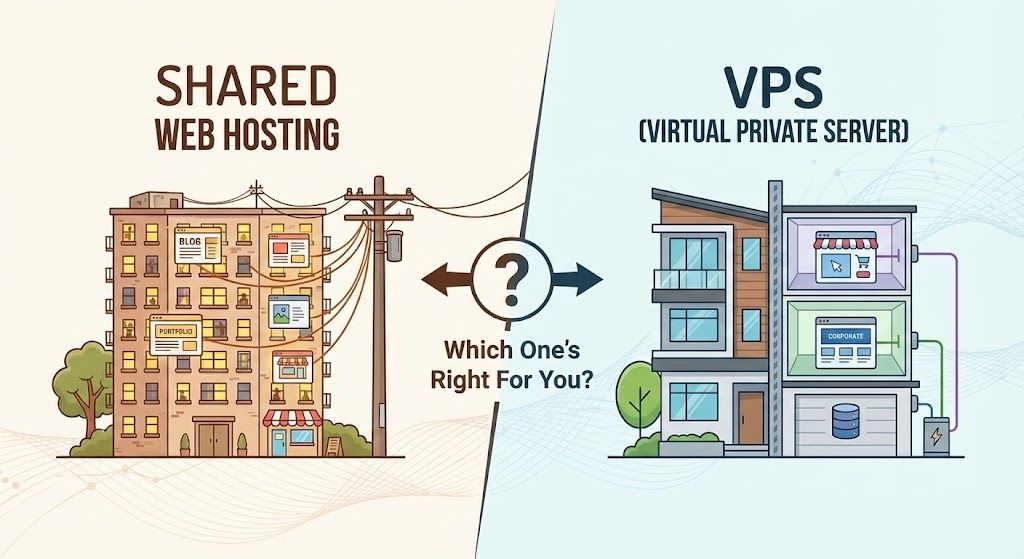
Shared Web Hosting vs VPS: Which One’s Right For You?
Ever stared down the hosting aisle and felt your brain melt just a little? Shared web hosting vs VPS: it's like picking between a dorm room and your own city apartment, and both yell, "BEST DEAL." in flashing neon. Feeling that beginner's twinge of "What if I just break the internet?" Don't sweat. I've been there. Whether you're spinning up your first WordPress blog, launching a pet-snuggie store, or dreaming of world domination, choosing the right hosting is a legit milestone. This guide breaks it all down, chucks the jargon, and gets painfully honest about what actually matters (read: what won't leave you speed-cursing at 2am).
Let's unpack each choice, weigh the trade-offs, peek behind the curtain (yes, real sites and numbers), and I'll even spill on who I trust most, spoiler: Devoster knocks it out for both shared and VPS hosting. Ready? Bring your coffee. I'll bring mine. Let's do this.
Key Takeaways
- Shared web hosting is best for beginners and low-traffic sites thanks to its affordability and ease of use.
- VPS hosting offers dedicated resources, higher performance, and better security, making it ideal for growing businesses and demanding applications.
- Upgrading from shared web hosting to VPS becomes necessary when site traffic increases, performance lags, or custom configurations are needed.
- Choosing between shared web hosting vs VPS depends on your technical skills, growth plans, and the critical nature of your website’s performance.
- Managed VPS solutions, like those offered by Devoster, simplify hosting by handling maintenance and security so you can focus on your business.

Start fast with Shared Web Hosting
The simplest, most affordable way to get online. Includes SSL, CDN, and solid performance.
Browse plansTL;DR: shared web hosting vs vps (quick answer)
Short on time (or patience)? Here's your straight-up cheat sheet:
Shared hosting = The cheap, friendly starter. Think: renting a bunk in a hostel. Good for blogs, portfolios, tiny shops. Easy, low-maintenance. But you share everything with random neighbors.
VPS = Your own apartment (virtually speaking). Way more power and privacy. Pay more, get more. Needed for growing businesses, busy ecommerce, or anything needing custom stuff.
My quick tip? If you're even a little bit serious, VPS is almost always worth it within months. But if you're dipping your toes or just need a place to park a basic site, shared wins. Devoster is my go-to for both (their shared plans are wildly no-fuss, and their VPS knocks out the competition on value and support).
Let's get you the right fit…
What is shared hosting?
How shared hosting works (multi-tenant model)
Picture this: a big apartment building where dozens (sometimes hundreds) of tenants cram into the same utility pipes. That's shared hosting. Your site cozies up alongside many others, sharing all hardware, power, and common resources.
Typical technical specs and limits (disk, RAM, CPU, I/O)
- Disk Space: Usually 10GB–100GB SSD (sometimes much less, watch for asterisks).
- RAM: Maybe 512MB–2GB, but shared across everyone. Translation: Not really "yours."
- CPU: Barely a fraction of a CPU core, bursts allowed, but throttled during peak.
- I/O: Disk input/output limits mean big file uploads or traffic spikes can slow to a crawl.
Pros of shared hosting
- Ridiculously cheap. As low as $2–$5/mo on promo (Devoster's base shared blows most out of the water for features per dollar).
- Beginner-friendly: No server wrangling. Control panel, wizards, 1-click installs. Stress level: weirdly low.
- Maintenance-free: Hosts patch and maintain the core stuff. You just worry about your site.
Cons and common limitations
- Resource hogs: If your neighbor's site goes viral, you pay the slowdown tax.
- Limited customization: No root, limited software. Can't install wild stuff or fine-tune PHP.
- Security risk: If someone else gets hacked...well, it's your risk too (Devoster is better than most with isolation, but it's still "shared").
- Upgrade speed bumps: Need more power? Migration is usually required.
Typical use cases and real examples (blogs, brochure sites, low-traffic stores)
- Mom-and-pop bakeries showing off cupcakes.
- Hobby blogs and personal portfolios (think: artist showing off their stuff).
- Nonprofit or local club with a single page and contact form.
- Test or temporary sites.
Real site: My friend's dog-walking blog lives happily on Devoster's shared hosting, three plug-ins, 200 visits/day, never a single hiccup after two years. Still cost her less than a Starbucks grande every month.
What is VPS hosting?
How VPS works (virtualization, resource allocation)
Time to upgrade your living situation: with a VPS (Virtual Private Server), your hosting provider carves out a chunk of a physical machine just for you. You get guaranteed CPU, RAM, and storage that no one else can mess with, it's still on shared hardware, but the slices are enforced with total nerd magic (virtualization tech).
Managed vs unmanaged VPS: what changes and why it matters
- Managed VPS: The host handles security, updates, and troubleshooting (Devoster excels here). You focus on your sites, they handle the scary stuff.
- Unmanaged VPS: You're the sysadmin now. Full control, but any outage means you're googling at 3am. Only tackle if you're confident in the terminal.
Typical technical specs (vCPU, RAM, disk types, IOPS)
- vCPU: Starts at 1-2 virtual CPUs, scales to 8+.
- RAM: Usually 1–32GB dedicated. More = faster and more resilient under load.
- Disk: SSD and sometimes NVMe (crazy fast). 20GB–500+GB.
- IOPS: You get your own chunk of disk performance. Great for database-heavy stuff.
Pros of VPS hosting
- Performance: No more "screaming neighbor" headaches. Dedicated resources = reliable, fast.
- Customizable: Run anything you need, Node.js, custom databases, cron jobs. Root/Sudo access comes standard.
- Scalability: Upgrades are often one-click. Outgrow your plan? Add RAM or CPU without migrating.
- Isolation: Security boundaries are way better.
Cons and trade-offs
- Cost: $10–$80/mo is normal for quality managed VPS. More if you go big (still cheaper than a real server).
- Needs more know-how: Especially for unmanaged. (Managed? Devoster makes it pretty plug-and-play.)
- You might need to handle your own backups. Some hosts offer, some don't (Devoster's backups are stellar, thank you very much).
Typical use cases and real examples (ecommerce, SaaS, apps, dev/test)
- Thriving online stores (think: WooCommerce with hundreds of products and real traffic).
- SaaS prototypes, business sites, or apps needing room to grow and never slow down.
- Development/testing setups for agencies.
- Membership sites, forums, and anything "dynamic."
Real site: My buddy's custom sneaker store moved to Devoster VPS last Black Friday. She went from "site down during sales rush" to "bring it on, bots", site didn't even blink when traffic doubled.
shared web hosting vs vps: detailed comparison
Let's get brutally practical. Here's the side-by-side run-down:
| Feature/Aspect | Shared Hosting | VPS Hosting |
|---|---|---|
| Price Range | $3–$15/mo | $10–$80+/mo |
| Performance | Good (light loads) | Excellent (customizable) |
| CPU/RAM | Shared | Dedicated |
| Custom Software | Rarely | Yes |
| Security | Shared risk | Isolated |
| Root/Sudo Access | No | Yes |
| Backups | Varies (Devoster: yes) | Often optional |
| Support | Basic | Advanced |
| Uptime SLA | 99%–99.9% | 99.95%+ |
Cost: expected price ranges and hidden fees
Shared looks dirt cheap up front. But beware: renewal rates jump fast, and addon costs (email, SSL, extra domains) get sneaky. VPS seems pricier, but often has flatter pricing, and you actually get what you pay for.
Performance: CPU, RAM, disk I/O and measurable impact
If your site is lightweight, shared is often fine. But a big WooCommerce store or busy blog? Shared slows way down under load (been there). VPS? Night-and-day faster. Devoster's entry VPS can handle traffic spikes my old shared host choked on.
Resource allocation and noisy-neighbor issues
Shared: hope your site mates are chill, or you'll notice. VPS: your resources are yours, and predictable.
Scalability and upgrade paths
Shared often means migrating if you grow. VPS lets you upgrade plans behind-the-scenes, sites stay up.
Security and isolation: practical implications
No host truly isolates shared accounts the way VPS does (virtual firewalls, resource fencing). If you value peace of mind, VPS wins, especially with Devoster.
Control and customization: control panels, root/SSH access
Want to tweak Apache configs, or install wild backend tools? Only VPS gives you root/SSH.
Backups, snapshots and disaster recovery options
Shared: Usually just basic backups, sometimes weekly. VPS: Snapshots, daily backups, even instant rollbacks (Devoster's UI for this is a lifesaver).
Uptime, SLAs and support response
Shared usually offers 99%–99.9% uptime, with good but basic support. Quality VPS? 99.95%+ and expert-level, especially for urgent stuff. When my site broke spectacularly on a Friday night, Devoster's VPS support hands-down saved the day.
Email hosting, DNS and ancillary features
Shared: Email is bundled in, but not always great (spam issues, size limits). VPS: often BYO or paid (but you can pick your favorite, like Google Workspace).
SEO considerations: does hosting choice affect SEO?
Indirectly, yes. Slow or often-down sites get the Google cold shoulder. Faster sites (VPS.) hold visitors longer (lower bounce), which can bump search performance.
Performance benchmarks and examples
Let's get as nerdy (or non-nerdy) as you want:
Sample benchmark scenarios (pages: WordPress blog, WooCommerce product page)
Shared hosting test: Simple WordPress blog homepage, no plugins: ~800ms load time with zero traffic. Add some plugins, and the number inches up (1.2–2s). WooCommerce? Double the traffic…and often double the frustration.
VPS test (Devoster): The same WP blog, now with 6 plugins, loads in under 400ms. Under heavy WooCommerce cart traffic (10 users at once): still comfy under 0.8s.
Expected response times and concurrency thresholds
| Plan Type | Avg. Load w/Light Traffic | Stable With... |
|---|---|---|
| Shared Hosting | 1–1.5s | ~10–15 visitors |
| Entry VPS | 400–800ms | ~40+ visitors |
| Mid-Tier VPS | <300ms | ~100+ visitors |
Takeaway: If traffic or plugins climb, VPS wins, a lot.
Real-world decision guide: Which to choose and when
Let's kill the "it depends" dance. Here's how to call it:
Traffic thresholds and rule-of-thumb (visits/month, concurrent users)
- Shared: Fine for <5,000 visits/month, or 5–10 people online at once.
- VPS: The sweet spot when you're anywhere north of those numbers.
Site-type matrix (blog, portfolio, small store, medium ecommerce, SaaS)
| Type | Shared Hosting | VPS Hosting |
|---|---|---|
| Personal Blog | ✅ Best pick | Maybe |
| Portfolio/Simple | ✅ Best pick | Maybe |
| Small Business | ✅ Fine | Good |
| Small Store | Maybe | ✅ Much better |
| Mid-Size Ecommerce | ❌ Likely to struggle | ✅ Best pick |
| SaaS/App | ❌ No way | ✅ Must-have |
Decision flowchart / step-by-step checklist
- How critical is uptime/speed? If your site matters for money: VPS.
- Traffic now or anticipated? Over ~5,000/mo? VPS.
- Using anything custom? If yes, VPS.
- Confident with basics only? Shared.
- Room to grow? VPS lets you scale without headaches.
Honestly, my "if you're still unsure" advice: chat with Devoster. They walk you through it, and never push you to overbuy.
How to migrate from shared hosting to VPS (practical checklist)
Migration anxiety? It's a rite of passage. But you'll thank yourself (and me) in minutes when your new site FLIES.
Pre-migration: inventory, backups, testing environment
- Inventory: List every site, subdomain, and email. You will forget one. (I have.)
- Backup: Download backups from your shared host and your own copy (belt and suspenders, trust me).
- Testing ground: Stage it up on your new VPS before the big cutover.
Migration steps: files, databases, email, DNS cutover
- Copy files and images (FTP/SFTP is your BFF here).
- Export/import databases (phpMyAdmin or command line).
- Set up mailboxes on the VPS or route through external provider.
- DNS switch. Lower TTL first so changes spread fast. Plan for a few hours of weirdness.
Post-migration testing and rollback plan
- Visit everything, every page, every form, every cart.
- Email yourself a test message.
- If disaster strikes, be ready to roll back to the old host. (Did I mention "test backups"?)
Common migration pitfalls and how to avoid them
- Forgot hidden files (like .htaccess)? Site-bust city.
- Email… always somewhere, but rarely where you expect. Plan ahead.
- Watch out for version mismatches (PHP/MySQL). Run what you tested, not what "should work."
How to choose a hosting provider: VPS vs shared checklist
Here's how you spot the good, the bad, and the ugly in hosts:
Managed features to look for (backups, monitoring, security)
- Backups: Automatic and usable. (Devoster: daily, easy restore, love it.)
- Monitoring: Error/warning alerts before downtime.
- Security: Anti-malware, DDoS defense, regular patches.
Network, data center locations and latency considerations
Where are your customers? Closest data centers = snappier loads. Some hosts (ahem, Devoster) list their physical locations. Ask before you buy.
Support, SLAs and escalation
- Support quality: 24/7 human, not "please submit a ticket" bots.
- SLAs: Will they actually credit you if they mess up?
Cost comparison: sample plans and total cost of ownership
Let's do the math no one talks about:
Example monthly costs: low, medium, high scenarios
| Hosting Type | Low End | Mid-Range | High-End |
|---|---|---|---|
| Shared (Devoster) | $3/mo | $10/mo | $15/mo |
| VPS (Devoster) | $11/mo | $25/mo | $80+/mo |
TCO: managed services, developer time, extensions and backups
Shared: Lower sticker, but may get nickel-and-dimed (SSL, better support, daily backups…)
VPS: Pricey upfront, but managed plans often save money on outside dev help, site hacks, or rollbacks. (Devoster folds a ton into base VPS price, while others hike things for "essentials.")
One of my happiest surprises? After switching to Devoster VPS, I spent less than before fixing plugin and downtime issues, and never paid for premium backup tools again.
Performance tuning & best practices for each environment
Let's squeeze more out of what you pay for:
Shared hosting optimizations (caching, image optimization, CDN)
- Use the host's built-in caching (Devoster does this right-out-the-box).
- Serve tiny, efficient images (WebP is magic for photographers).
- Cloudflare or similar CDN = global speed, local price.
- Trim plugins/scripts, the less bloat, the better.
VPS optimizations (server stack tuning, caching layers, vertical/horizontal scaling)
- Tweak the server stack: PHP-FPM, Nginx, Redis, all fair game.
- Layer-in server- and application-level caching.
- Monitor with real dashboards (Glances, Netdata are my jam).
- Add resources as you grow. Actually… you can even cluster with some VPS plans for wild scaling (yep, at Devoster too.).
Security best practices for shared hosting and VPS
Security isn't optional. Here's how to sleep better:
Shared-hosting-specific protections (isolation, account-level security)
- Use strong, unique passwords for cPanel.
- Two-factor where offered.
- Keep your CMS/plugins updated, a single outdated plugin = open door for everyone (Devoster keeps accounts walled off, but you're still only as strong as your weakest link).
VPS security checklist (firewalls, automatic updates, intrusion detection)
- Enable your VPS firewall (set and forget, until you need it).
- Schedule (or automate.) OS and patch updates.
- Monitor logs, and set up alerts for weird activity, go beyond "if it ain't broke…"
- SSH key auth > passwords.
If you're not a security nerd, opt for a managed VPS, Devoster patches vulnerabilities and alerts you first.
When to upgrade from shared hosting to VPS (signs & metrics)
Performance indicators, error rates, CPU/RAM throttling
- Spiking page load times
- Resource limit warnings (email from host)
- Increase in 500 errors or "Service Unavailable"
Business signals: revenue impact, compliance, feature needs
- Lost sales due to site downtime
- Need for custom integrations or complex database queries
- Compliance obligations (PCI, GDPR, medical records, these love VPS isolation)
My personal rule? If site performance is stressing you more than the price of a pizza, it's time to level up.
Alternatives and next steps beyond VPS
Exploring the wild world beyond VPS? Here are paths for when your site gets big (or weird):
Managed WordPress, cloud platforms, container hosting, dedicated servers
- Managed WordPress: Simplest for WordPress-only sites. Security, backups, and speed, hands-off.
- Cloud platforms (AWS, Google Cloud): Extreme scale, but more hands-on.
- Container hosting (Docker/Kubernetes): For apps needing wild flexibility.
- Dedicated servers: When you want to own everything, and wrangle hardware yourself.
When to consider cloud autoscaling vs VPS
- Consistent, predictable traffic? VPS stays king.
- Spike-prone, fast-growing, or "I could be the next Reddit"? Cloud hosting's autoscaling stops freakouts (but your first migration will be... memorable).

Have questions? Get in touch
Not sure which plan fits or how crypto billing works for you? We're here to help.
Contact usFAQs: shared web hosting vs vps
Is VPS better for SEO?
If Google can reach your site faster, yes. VPS hosts mean lower load times, less downtime. Don't ignore content, but hosting does matter.
How many websites can I host on VPS?
Depends on specs, but most entry VPS (like Devoster's) handle 10–20 modest sites easily. More power = more sites.
Do I need technical skills for VPS?
Only if you go unmanaged. Managed VPS (again, Devoster shines) is as easy as modern shared hosting.
Can I run custom software or cron jobs on shared hosting?
Usually not. Shared is locked down. VPS? Go wild.
How long does migration take and will there be downtime?
Few hours for most sites. Smart planning (and backup) = almost no downtime. I migrated six sites to Devoster VPS in one Sunday afternoon, and only missed one meme in the group chat.
Summary & recommended choices by scenario
Here's your rallying call. If you're:
- A total beginner or on a tiny budget: Shared hosting (Devoster's starter plan is $3-ish/month, so you don't even lose coffee money).
- Tiny business/side hustle: Shared or low-end VPS for safety, flexibility.
- Lightning-fast growth, or downtime = lost sales: VPS. Lock it in. Managed, if you want sleep.
- A developer, agency, or control nut: VPS all the way.
Bottom line? You can start on Devoster shared, and if you outgrow it, their team migrates you to VPS with almost zero pain (they did it for me. Twice. With cat memes in the support ticket).
Resources & further reading
Migration tools, benchmarking tools, provider comparison templates
- Migration: Devoster's own migration wizard, or All-in-One WP Migration plugin for WordPress moves.
- Benchmarks: Loader.io, GTMetrix, WebPageTest, all free (I use GTMetrix monthly, nerdy but useful).
- Choosing a host: Make a table, features vs price. Or just chat with Devoster's sales team for the truly non-robotic breakdown.
That's a real-world tour of shared web hosting vs VPS, pitfalls, side-eye, confetti, and all. Whether you're just mapping out your first splash page or wrestling with Black Friday traffic, remember: start where you are. You can always scale up. (And really, Devoster makes both roads less bumpy. Can't recommend them enough.)
Drop me a comment or send a meme if you've got questions. Hosting nerds welcome.
Ready to Experience Devoster?
Join thousands of satisfied customers with transparent pricing and lightning-fast hosting.