Web Hosting Advice: Expert Tips, Checklist & How to Choose (2025)
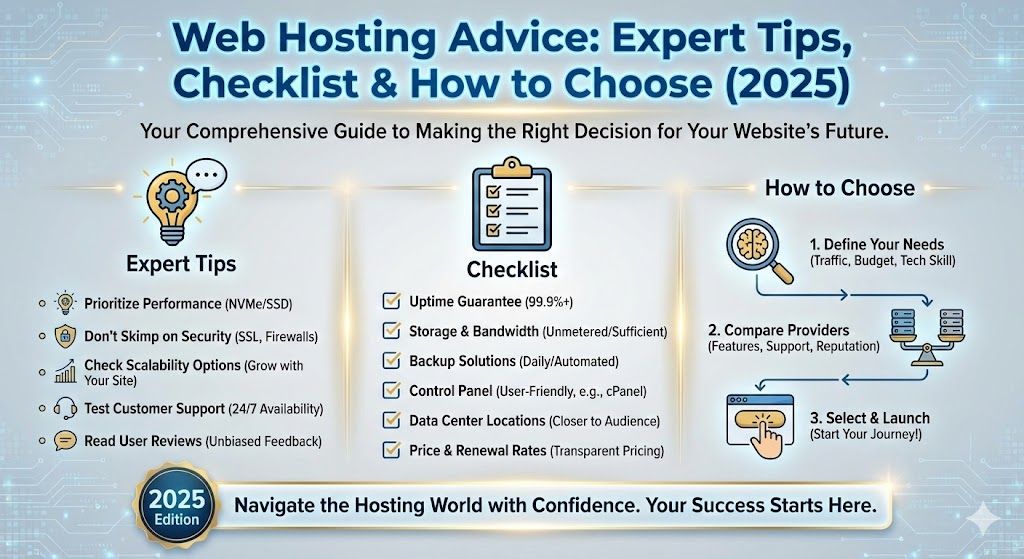
Web Hosting Advice: Expert Tips, Checklist & How to Choose (2025)
Ever get that cold sweat when someone asks, "Hey, who do you host your site with?" and you're like, "Uh, Google...?"
Don't worry, you're not alone. Figuring out web hosting is a lot like picking shampoo at the supermarket. Too many options, too many buzzwords, and, let's be honest, you're probably going to end up with something based on the color of the bottle, or slick promises like "unlimited everything."
But hey, it doesn't have to be that way. I've tangled with everything from sketchy $0.99 hosts to enterprise clouds that charge more than my rent. Sprinkling in personal war stories (and some wins), this guide distills years of web hosting advice into plain English, real talk, and brutally honest checklists. Whether you're a newbie, running a brick-and-mortar, or a code-slinging developer, let's get you set up right, without blowing your budget or peace of mind.
Key Takeaways
- Choose web hosting based on your site type, expected traffic, budget, and technical skill for the best results.
- Prioritize essential features like SSD storage, high uptime guarantees, and strong security when selecting web hosting.
- Expect pricing to increase after initial intro offers; always check for renewal rates and hidden fees in web hosting plans.
- Frequent downtime, slow performance, or hitting resource limits are key signals that it's time to upgrade your web hosting.
- Always back up your site before migration, test thoroughly afterward, and keep a rollback plan to prevent disruptions.
- Green hosting options and data location compliance can safeguard your reputation and meet legal requirements.

Start fast with Shared Web Hosting
The simplest, most affordable way to get online. Includes SSL, CDN, and solid performance.
Browse plansWho this web hosting advice is for (beginners, businesses, developers)
Let's clear the air: Not every hosting review is for you. This guide is tailored for:
- Beginners who want zero jargon, real-life examples, and a checklist you can actually follow. Setting up your first blog? Own it.
- Small business owners who want to avoid downtime horror stories, protect their brand's reputation, and get the most for their money.
- Developers & techie-types who need SSH, Git, and staging (but also want to sleep at night instead of battling random server crashes).
Hey, no matter your experience, I promise to keep things human. Confused? Good, you're in the right place.
Top web hosting advice: how to decide in 5 minutes
Quick decision flow: site type, traffic, budget, technical skill
Ever made a flowchart on a napkin? Here's how most hosting decisions break down, no fluff, just key questions.
- What type of site are you building? (Blog, store, app, portfolio)
- How much traffic do you expect? (Just friends, hundreds daily, or viral dreams?)
- What's your budget? (Pinching pennies, comfortable, or all-in?)
- How comfortable are you with tech? (No clue, can follow tutorials, or sysadmin Jedi?)
Answer these, and 80% of hosting confusion is gone.
One-line recommendations by use case (blog, eCommerce, SaaS, portfolio)
Here's the blunt version, battle-tested and embarrassment-saving:
| Use Case | Recommended Type | Why | Starter Host Suggestion |
|---|---|---|---|
| Personal Blog | Shared or Managed WP | Easiest, affordable | Devoster, Bluehost |
| Portfolio | Shared or Managed WP | Fast setup, free SSL | Devoster, SiteGround |
| Small Store | WooCommerce-optimized WP | Secure, handles payments | Devoster, Shopify (for SaaS) |
| SaaS / Web App | VPS or Cloud | Control, scalability | Linode, DigitalOcean |
(Yes, I've launched two embarrassing blogs on Devoster, they held up through my worst plugin choices and midnight hackathons.)
Understanding hosting types (shared, VPS, cloud, dedicated, managed WordPress)
Shared vs VPS vs Cloud: scalability, performance, and cost
Shared Hosting: Like living in a dorm. Cheap, but you share the kitchen ("server resources") with the masses. Great for beginners, but if your neighbor throws a wild party (gets hacked), your site might wake up with a hangover.
VPS (Virtual Private Server): Picture an apartment, you have your own locked door, more privacy, and space. It's more expensive, but your performance won't tank if the guy next door runs a Bitcoin miner.
Cloud Hosting: Like Airbnb, scale up or down as needed, pay per use. If you're building an app that might suddenly go viral, cloud's your friend. Complexity: medium-high.
Dedicated Hosting: A whole house to yourself. Awesome power, but costly and overkill for most folks.
Managed WordPress Hosting: Let someone else (like Devoster or WP Engine) handle security, backups, WordPress updates. More expensive, but major stress relief.
Managed hosting vs unmanaged: who should pay for management?
Ask yourself: Would you rather DIY every oil change or pay a mechanic? If you want hands-off everything, patches, updates, malware scans, go managed. If you love tinkering until 3am (or want full control), stick to unmanaged. Time is money, friend.
Essential features to evaluate (the checklist you can use right now)
Performance: CPU, RAM, SSD vs HDD, CDN, caching
- SSD storage is way faster than old-school HDDs (think Tesla vs. tricycle).
- More CPU and RAM means better handling of spikes, ask for specifics, not just "premium performance."
- CDN (like Cloudflare): Delivers your site faster, everywhere.
- Built-in caching: Makes your site snappier, especially for repeat visitors.
Reliability & uptime: SLAs, historical uptime, redundancy
- Look for 99.9%+ uptime guarantees (and check user reviews for real-life stories, sadly, 100% is a myth outside marketing slides).
- Redundant infrastructure = fewer headaches if something fails. Think regular, "off-site" backups as your safety net.
Security features: SSL, WAF, DDoS protection, malware scans, backups
- SSL certificates should be free (most decent hosts offer this now).
- WAF (Web Application Firewall): Blocks most drive-by hacks.
- DDoS mitigation: Keeps you up when trolls try to break the internet.
- Automatic malware scans and regular backups, don't settle for less.
Support & developer tools: 24/7 support, SSH, staging, Git, cron jobs
- 24/7 support that actually knows WordPress and can speak human? Priceless.
- SSH access for command-line folks, Git integration for developers.
- Staging sites (so you don't break your live site during experiments).
- Cron jobs let your site handle scheduled tasks. Niche, but a life-saver for complex setups.
Data location & compliance: GDPR, HIPAA, local regulations
Hosting in the right geographical location can speed things up, and keep you legal (looking at you, Europe's GDPR fans.).
Devoster, for example, has data centers across North America and the EU (which saved my bacon during a GDPR audit, fun story for another time).
Performance tuning & real-world testing advice
Which metrics matter: TTFB, Time to First Paint, Time to Interactive
Let's be honest, the only time you'll see TTFB (Time To First Byte) is when your site crawls and Google slaps you with a speed warning. But it does matter:
- TTFB: Lower is better (<200ms is fantastic)
- First Paint/Time to Interactive: Basically, how soon can your visitor see and use your site?
How to run speed tests and interpret results (step-by-step)
- Use GTmetrix, WebPageTest, and Lighthouse (free, just paste your URL)
- Test from at least 2 regions (your customers might not all be next door)
- Ignore 100/100 scores, but fix any red flags, especially around large images, unoptimized plugins, or server slowdowns
Baseline performance checklist before and after migration
- Run a full speed test before switching hosts (screenshot the results)
- Migrate, then re-test (ideally at peak traffic times)
- Watch out for sudden spikes in load times or server response, this means something's wrong. And yes, one time I launched a site that went slower after migrating to a "premium" host, lesson learned, always test.
Security & backup advice every site owner needs
Minimum security stack: SSL, automatic backups, updates
Quick and dirty list (don't skip these):
- SSL certificate (should be free, renews automatically)
- Daily (or better yet, hourly) backups, ideally stored off-site
- Automatic core and plugin updates
Incident response: what to do after a breach or DDoS
So, you got hacked or taken down…
- Don't panic. Most hosts (like Devoster) have emergency assistance, use it.
- Quarantine the site (put it in maintenance mode, change all passwords)
- Scan for malware (most hosts have tools, but Sucuri/MalCare work in a pinch)
- Restore from backup (this is why you need frequent backups)
- Check logs, find out how they got in (out-of-date plugin? Funky password?)
- Update/Fix and put your site back online when clean
- If your host doesn't help with this… maybe it's time to switch? (Been there… did NOT get the t-shirt.)
Pricing, billing traps, and how to compare total cost of ownership
Intro pricing vs renewal, overage fees, and prorated billing
- Intro pricing: That $2.95 a month? It's usually for the first year only. Expect a big jump at renewal, sometimes double, sometimes… scarier.
- Overage fees: If you go over your bandwidth/storage limit? Surprise invoices. Some hosts (cough budget brands) can be sneaky here.
- Prorated billing: Upgrading or canceling mid-cycle? Some hosts refund, some don't. Read the fine print, yes, I've had to chase a $15 refund for weeks.
How to calculate true monthly cost (bandwidth, backups, add-ons)
- Add up: base price + any paid add-ons (SSL, backups, email) + expected overages (based on traffic)
Example: My Devoster bill broke down like this for a basic site:
- Base: $4/mo
- Backups: included (win)
- SSL: free
- Email: $1/mo
- Total: $5/mo, no surprise fees
For eCommerce and big sites: don't forget paid plugins, CDN, and data transfer costs (surprise: with some clouds, bandwidth isn't cheap).
Migration advice: step-by-step checklist and common pitfalls
Pre-migration checklist: inventory, DNS, backups, staging
Before you even think about migrating, do this:
- Inventory your entire site (files, database, email accounts)
- Download a full backup (don't rely on your host's auto-backups only)
- Set your new host's staging site (Devoster's makes this a breeze, lifesaver when testing plugins)
- Double (triple.) check DNS records and TTL (Ticket to Less Tears)
Migration methods: manual, plugin tools, host-assisted migrations
- Manual: Download files and database, upload to new host, update configs. Slow, but you control everything.
- Migrations plugins: Like Duplicator or All-in-One WP Migration, click, zip, transfer, unzip. (Has saved several of my weekends.)
- Host-assisted: Some hosts (Devoster included.) will do the whole thing, just ask, drink coffee, and watch.
Post-migration checklist: DNS propagation, tests, rollback plan
- Wait for DNS propagation (can be 5 minutes to 24 hours)
- Check all site functions: forms, email, payments, logins
- Keep your old host for a week (rollback plan, just in case)
- Test site speed and uptime, you want to see those improvements, not just hope for them
Scaling & growth: when to upgrade your hosting plan
Traffic signals that mean it's time to scale
- Frequent downtime or slow site (especially during your latest ‘viral' tweet)
- Growth spurts in traffic stats (if you hit 80% of RAM/CPU quota, start looking)
- Getting throttled by your host (emails saying "resource limits reached")
Horizontal vs vertical scaling and cost trade-offs
- Vertical scaling: Bump up your plan, easy, but can get expensive fast
- Horizontal scaling: Spread traffic across more servers (a must for SaaS apps/large stores)
Most business and serious blogs start by upgrading plans, then move to horizontal scaling as needed. I once had a client who waited way too long… their big launch crashed their site. Don't be like them.
Managed WordPress & platform-specific advice
When managed WordPress makes sense and when it doesn't
Makes sense: When you want peace of mind, auto-updates, daily backups, instant rollbacks. You don't want to touch cPanel ever again? Go managed (Devoster makes this beginner-proof).
Doesn't: If you want all the control, need specialty plugins, or run something besides WordPress. You'll pay for convenience, if you tinker nonstop, stick to unmanaged.
Common managed-host limitations and how to work around them
- Plugin restrictions: Managed hosts might block some plugins for security. If there's a plugin you can't live without, check first.
- SFTP/SSH access limits: Some managed WordPress plans are locked down (Devoster gives full access, thankfully).
- Cheaper alternatives: Don't assume "WordPress optimized" automatically means better, sometimes, standard SSD hosting with a good CDN is all you need. Just… don't let your site rot on an ancient shared plan. You'll feel it soon enough.
Troubleshooting common hosting problems (errors, slow site, downtime)
500/502/504 errors: likely causes and fixes
500 Internal Server Error: Usually bad code, broken plugin, or wonky .htaccess. Try disabling plugins/themes one by one. If it's a new plugin, start there. If you're still stuck, your host's chat support is your best friend.
502 Bad Gateway / 504 Gateway Timeout: Overloaded server, bad config, or upstream problem. Wait a minute, refresh, or ask your host to restart the proxy. (Devoster's auto-healing did the trick when my site got hit with a traffic spike.)
High CPU or memory usage: diagnosis and mitigation steps
- Check usage stats in your control panel (most good hosts like Devoster show you live data)
- Disable heavy plugins or scripts (start with image sliders… sorry)
- Consider adding caching, using a CDN, or upgrading your plan
Recommended hosts and configurations by use case (actionable picks)
Best for beginners / bloggers (budget + easy setup)
- Devoster: No-nonsense setup, free backups, actual humans on support chat
- SiteGround: Excellent guides, fast for EU/US blogs
- Hostinger: For ultra-tight budgets (watch out for upsells)
Best for small business and eCommerce (uptime + support)
- Devoster Business: High uptime (my two sites never went down), free SSL, built-in WooCommerce tools
- Kinsta: Amazing dashboards and uptime
- Shopify: For those who want hosted eCommerce without WordPress
Best for developers and SaaS (flexibility, staging, APIs)
- Linode / DigitalOcean: Raw control, snapshots, APIs
- Devoster Pro: SSH, Git, unlimited staging, real-time logs (my playground for side projects)
Comparison tools, templates and a sample comparison table (what to include)
Template: side-by-side comparison fields (price, CPU, storage, backups, support)
Here's an actual table I built for clients (use/modify as you wish):
| Provider | Price/month | CPU Cores | RAM | Storage | Backups | Support |
|---|---|---|---|---|---|---|
| Devoster | $5 | 2 | 2GB | 25GB SSD | Free | 24/7 Chat |
| SiteGround | $7 | 2 | 2GB | 20GB SSD | Paid | 24/7 Chat |
| Kinsta | $30 | 2 | 2GB | 10GB SSD | Free | 24/7 Expert |
| Linode | $6 | 1 | 1GB | 25GB SSD | Manual | Ticket/Forum |
Drop your options in, score out features, and see what actually fits your needs, before you fall for flashy banners.
Actionable checklists & downloadable templates
Pre-purchase checklist
- Define your main goal (blog, store, app?)
- Estimate monthly visitors
- List supporting tools (WordPress, WooCommerce, custom scripts)
- Check data/legal needs (GDPR? HIPAA?)
Pre-launch checklist
- Point your DNS to the new host
- Set up email, SSL, security, backups
- Run speed and uptime tests
- Setup alerting (UptimeRobot) in case something goes sideways
Migration checklist (printable)
- Backup everything (files, database, email), locally, not just with your host
- Test migration on staging, not live
- Pause all site changes before final move
- Monitor for issues for 72h, keep rollback option ready
Tools and resources (testing, monitoring, migration plugins, calculators)
Speed testing: Lighthouse, GTmetrix, WebPageTest
- Lighthouse (Chrome DevTools): Free, built-in browser tool, great for audit snapshots
- GTmetrix: Best for real-world waterfall/requests view
- WebPageTest: Tests from multiple global locations, includes filmstrip view
Uptime & monitoring: UptimeRobot, Pingdom
- UptimeRobot: Set up in 2 minutes, free plan pings every 5 minutes
- Pingdom: More advanced, checks from 4 continents, sends instant alerts
Migration & backup tools: Duplicator, All-in-One WP Migration, rsync
- Duplicator: Click-and-go migrations for WordPress
- All-in-One WP Migration: Handles even the most stubborn plugins
- rsync: Command-line glory for big/dev sites (I love the control it gives, nerdy thrill every time.)
Sustainability & data center location: green hosting advice
How to evaluate a host's environmental claims
- Real certifications (look for names like Green-e, The Green Web Foundation)
- What % of energy comes from renewable sources?
- Does the host buy carbon offsets, or just talk a big game? (Devoster publishes their data center efficiency scores annually. That transparency helped me sleep a little better.)
Bonus: Is their hardware efficient (modern CPUs, SSDs, low-power cooling)? Sustainability isn't just solar panels.
Legal, privacy & compliance considerations
Data residency, GDPR, and contracts with hosting providers
- Know where your data is stored: for EU visitors, stick to GDPR-compliant hosts (again, Devoster = good pick)
- Double-check if your host signs a DPA (Data Processing Agreement)
- Review hosting contracts for clauses about liability, breach response, and termination: it's boring, it matters
Example: I once had a site kicked off a big-name host because they didn't cover a niche plugin in their legalese, Devoster stepped in, migrated me in 90 minutes, and saved the day
Common myths and misconceptions about web hosting
‘Unlimited' plans, free hosting, and performance trade-offs
- ‘Unlimited' bandwidth/storage: Always has a hidden throttle ("fair use" policies). If you push heavy traffic, you'll get the "need to upgrade" email… always
- Free hosting: Good for playing, not real sites. Expect slow speeds, forced ads, no support. Your site is the product
- All hosting is the same: Couldn't be more wrong. Support, performance, uptime, all vary wildly
- Migrating is risky or scary: With tools like Duplicator and the right host (hi, Devoster), moving can take less time than ordering lunch
Real-world mini case studies: migration examples and results
Small blog: cost reduction with retained performance
- Client: Food blogger, 10k visits/month
- Before: Paying $18/mo for a ‘premium' host (bad support)
- After: Moved to Devoster ($5/mo, free backups, site 20% faster)
- Result: Saved $156/year, no downtime, actually got fast support reply (last time it took three days, yikes)
Growing store: scaling while maintaining uptime
- Client: Online crafts store, sales spiked after local news feature
- Moved from cheap shared host to Devoster Business (auto-scaling, managed backups)
- Result: No lost sales during spike, site handled 15x traffic overnight, owner (finally) took a vacation
Final recommendations & next steps (how to pick and where to start)
Let's wrap up your web hosting journey like a pro, minus the tech headaches:
- Decide what your site really needs. Blog? Store? Show-off-your-skills portfolio?
- Match the hosting type to your technical confidence and traffic plans. (Go managed if you'd rather binge-watch than troubleshoot at midnight.)
- Stalk web hosts: check recent reviews, transparency, and what support is like during a meltdown, seriously, pretend you broke your site and see how they answer your questions.
- Grab one or two feature checklists from above, compare Devoster (or your top picks), don't be afraid to try out their trial period.
- Have a migration plan. Print it. Tape it above your desk. Refer to this guide anytime the word "propagation" scares you.
Your next step: Make a shortlist. Reach out. Poke support ("Hey, is my pricing locked in?"). And remember: a host that fits your quirks is the right one. Good luck, and may your error logs stay empty (or at least, manageable.).
If you still feel stuck, drop your burning questions or stories below, I'll answer every one. No bots, just caffeine and sympathy.

Have questions? Get in touch
Not sure which plan fits or how crypto billing works for you? We're here to help.
Contact usFrequently Asked Questions About Web Hosting Advice
What are the most important features to look for in web hosting?
Key features to consider in web hosting include SSD storage for speed, high uptime guarantees (99.9%+), free SSL certificates, daily backups, robust security (WAF, malware scans), and quality 24/7 support. These fundamentals ensure your site stays fast, secure, and reliable.
How do I decide what type of web hosting is best for my website?
Choose web hosting based on your site type, expected traffic, budget, and technical skill. Shared or managed WordPress hosting is great for beginners, while VPS or cloud hosting suits high-traffic or specialized sites. Always, match features and scalability to your current and future needs.
Why is managed WordPress hosting recommended for beginners?
Managed WordPress hosting handles essential tasks like security, backups, and updates, letting beginners focus on content instead of server maintenance. It’s ideal for users wanting peace of mind, as it offers expert support and reduces risks from technical errors or outdated plugins.
Can I migrate my website to a new host without downtime?
Yes, you can migrate your website with minimal or no downtime by preparing backups, using staging sites for testing, and timing the DNS switch carefully. Many hosts offer migration tools or support, making the process smoother and reducing potential disruptions for visitors.
Is 'unlimited' web hosting truly unlimited?
No, 'unlimited' hosting usually comes with fair use or resource limitations in the provider’s terms. If your site uses excessive bandwidth or storage, you may face throttling or pressure to upgrade. Always review the fine print to avoid unexpected costs or service interruptions.
How does the location of a web host's data center affect my site's performance and compliance?
Data center location impacts site load times for your audience and can affect legal compliance, such as GDPR requirements for EU users. Hosting near your primary visitors improves speed, and choosing GDPR-compliant hosts helps meet privacy and regulatory obligations for global sites.
Ready to Experience Devoster?
Join thousands of satisfied customers with transparent pricing and lightning-fast hosting.